

Like many operations leaders we’ve spoken to as of late, you’ve probably gotten the mandate from up high recently: “go use AI.” Uhh, great, where does one begin? How do I even think about what to use AI for?
You’re clearly not alone. But the questions remain!
Midmarket SaaS teams are racing to evaluate BDR agents, sales agents, and customer success agents — often without a clear framework for how these agents should actually work inside the business. More than anything, mandates are driven by FOMO rather than some grand architecture that outlines the path forward.
The result? A lot of experimentation, troubleshooting, demos, plenty of frustration, but not always a ton of business value.
Here’s how you can be different from the start: the teams getting the most from agents treat them less like magic software and more like employees with a clearly defined role.
This starts with a job description, like you would for any new role you’re onboarding for.
Agents Need Job Descriptions and Scorecards, Too
When well-prepared managers plan to bring onboard a human SDR or Customer Success Manager, they define:
- Responsibilities
- Success metrics
- Competencies, such as communication styles or interpersonal skills
- Tools they’ll use and systems they will interact with
- Who they collaborate with
- Process expectations
(We’re big fans of the WHO Methodology by Geoff Smart and Randy Street at OpFocus.)
Agents need a similar structure.
What’s different is that agents operate at a totally different scale and speed.
A human SDR might send 40 emails in a day, with the help of some templates and tools like Outreach or Salesloft. A sales agent can send thousands. If we don’t clearly define the process and guardrails upfront, mistakes scale quickly too (and then it’s our job on the line, whelp.)
Before building an agent, definition begins with clarity around:
- What do you want your agent to do?
- What data will you allow it access to?
- What systems, objects, and fields can it update?
- What does “good” look like?
- What kinds of output does it generate, and where might it need human review?
- Where does an agent hand off to a human, or vice versa?
The Biggest Difference Between Managing Humans and Agents
Now, if you were onboarding a new human team member, you put in place weekly check-ins, quarterly reviews, annual reviews, independent development plans, and so on for coaching and career development.
Agents will need governance in a different way. You’re going to want to keep an eye on:
- Is my data clean and accurate enough?
- Is my agent updating Salesforce correctly?
- Is its tone aligned with our brand?
- Is it prioritizing the right accounts?
- Are the workflows aligned with the rest of the business, including where humans take over?
Managing agents looks a lot like coaching a new employee, except feedback loops happen at a much faster clip, likely daily, not quarterly.
Plan to quickly assess and adjust:
- Messaging
- Workflow and process logic
- CRM updates
- Routing rules
- Escalation criteria
- Sentiment analysis thresholds
For example, OpFocus’ SDR agent has brought in Contacts whose roles don’t align with our target personas, and we’ve had to flag those issues and explain the difference to the agent – this might take a couple days to hone. There are cases of agents wanting a check in before moving to the next step and not starting automatically, and requires human confirmation that it is ok to keep moving forward – likely a few days to go through the different iterations. OpFocus’ internal sales ops agent has the directive to notify our head of operations if Opportunities are still in a certain stage after the 15th of the month, but it sometimes gets the stage wrong – this might require a few cycles to catch. Providing course corrections or feedback to your agent is not unlike coaching a new human team member, simply on shorter refresh cycles.
In this way, your work is never fully “done.” The best use of agents continuously evolve alongside the business (and yes, that means you’ll always have improvement work to do as an agent expands its scope and responsibilities beyond the initial MVP.)
Start By Mapping your Workflow
Before jumping into solutioning, like evaluating tools or building automations, map your current workflow first and get a clear picture of how your process works, in real life.
For example, if you’re building a SDR agent:
- Where do our leads currently come from?
- How do we identify ICP accounts? How is this clearly indicated in the system?
- What research and information should we gather before reaching out?
- What information would we want captured in Salesforce, and where?
- When does a human step in?
- Who receives the handoff?
Many of our customers realize they don’t need one giant agent; they need multiple focused agents working together to tackle the various aspects of each role. For a SDR AI Agent, for example, it might include the following task areas:
- Initial research and enrichment agent
- Outreach agent
- CRM hygiene and data cleanliness agent
- Meeting qualification agent
Breaking the gigantic role of a SDR’s workflow into smaller responsibilities usually helps ensure you’re capturing the necessary steps and substeps, and makes troubleshooting much easier later (ask us how we know.)
Begin with the End in Mind: Define Success Metrics Early
One of the biggest mistakes companies make with sales or customer success agents is skipping measurement planning. We know, everyone is eager to jump in and roll up their sleeves and get their hands dirty to play in the sandbox and experiment with cool toys and functionality. But if you can’t define success, it becomes difficult to showcase progress to your leadership team, justify your investment of resources and time, and improve the mechanism over time.
For SDR and BDR agents, useful metrics may include:
- Outreach-to-meeting conversion rate
- Response rate by persona
- Net new contacts identified
- Pipeline generated
- CRM data completeness
For customer success agents, you might consider:
- Customer sentiment trends
- Churn risk indicators
- Expansion opportunity signals
- Time-to-response improvements
- Executive escalation detection
As Salesforce consultants, of course we’re going to encourage you to track these metrics and showcase them in Dashboards in Salesforce (or whichever BI tool you use to track operations.)
The clearer your success metrics are upfront, the better your long-term agent evolution will be.
Agent Strategy Is Really Business Process Strategy
Many teams think, “if we throw AI at the problem, everything will be solved!” As much as we love it when things work automagically behind the scenes, the challenge often isn’t the tool or system itself. The devil is in the details of what comes before, in the form of people, process, and data. It’s aligning all of your teams and business areas, including:
- Sales
- Customer Success
- RevOps
- Leadership
- CRM processes
- Data quality
- Ownership rules
A good agent amplifies your existing processes. It also exposes where those processes are unclear.
That’s why documenting workflows and creating detailed agent “job descriptions” is the cornerstone to an Agent rollout.
How We’d Recommend Starting
If you’re early in your agent exploration, start simple:
- Identify 3-4 repetitive workflows in your target business area
- Write a short job description for each potential agent
- Define success metrics, at the individual contributor and team level
- Map the systems and review data sources involved, including data cleanliness & reliability
- Evaluate platforms that support those workflows
Here’s an example of an agent job description that we used in building a SDR Agent in Relevance AI:
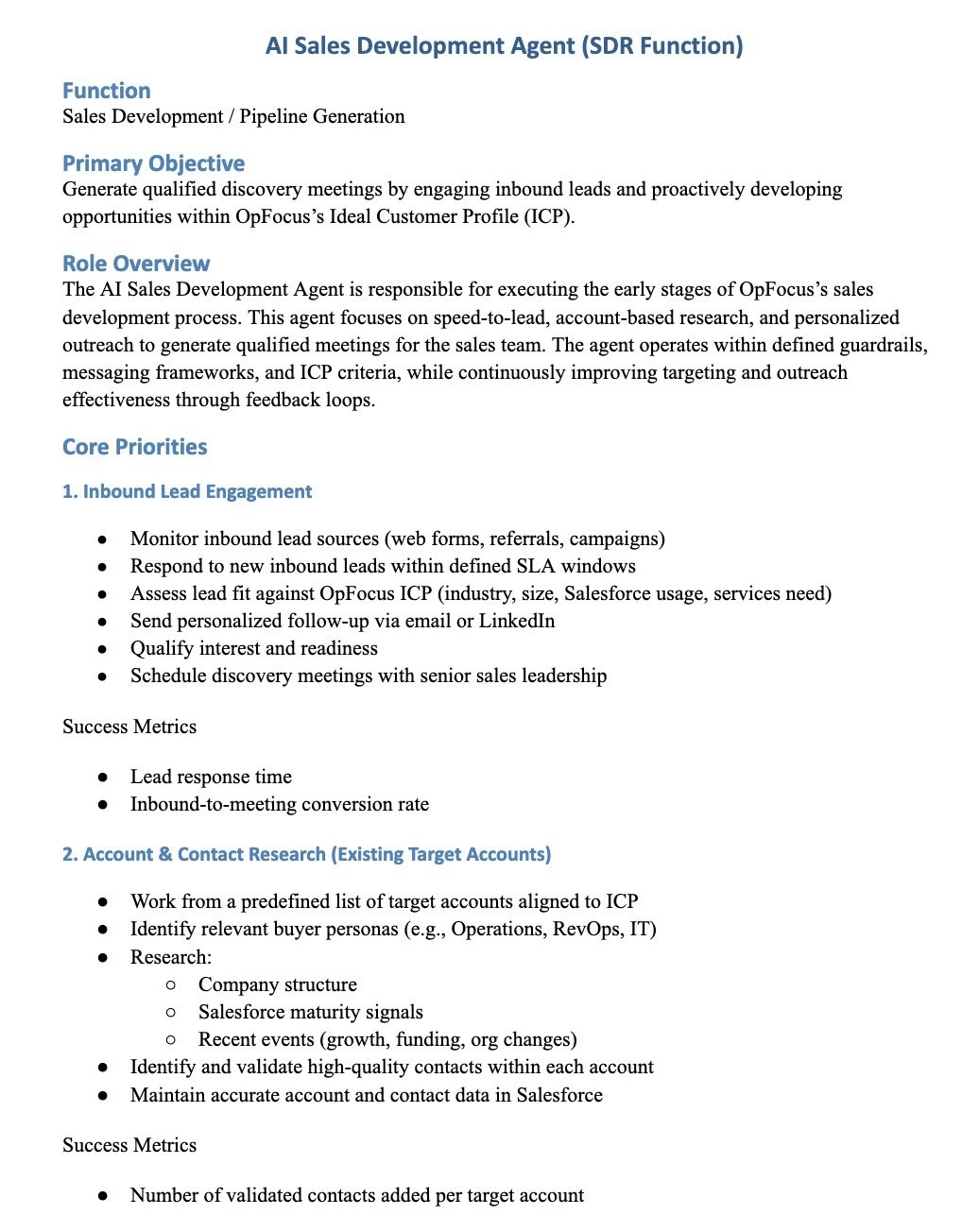
Many agent marketplaces (we like to use Relevance AI internally for its simplicity) can help you window shop for what’s possible off the shelf and accelerate iteration.
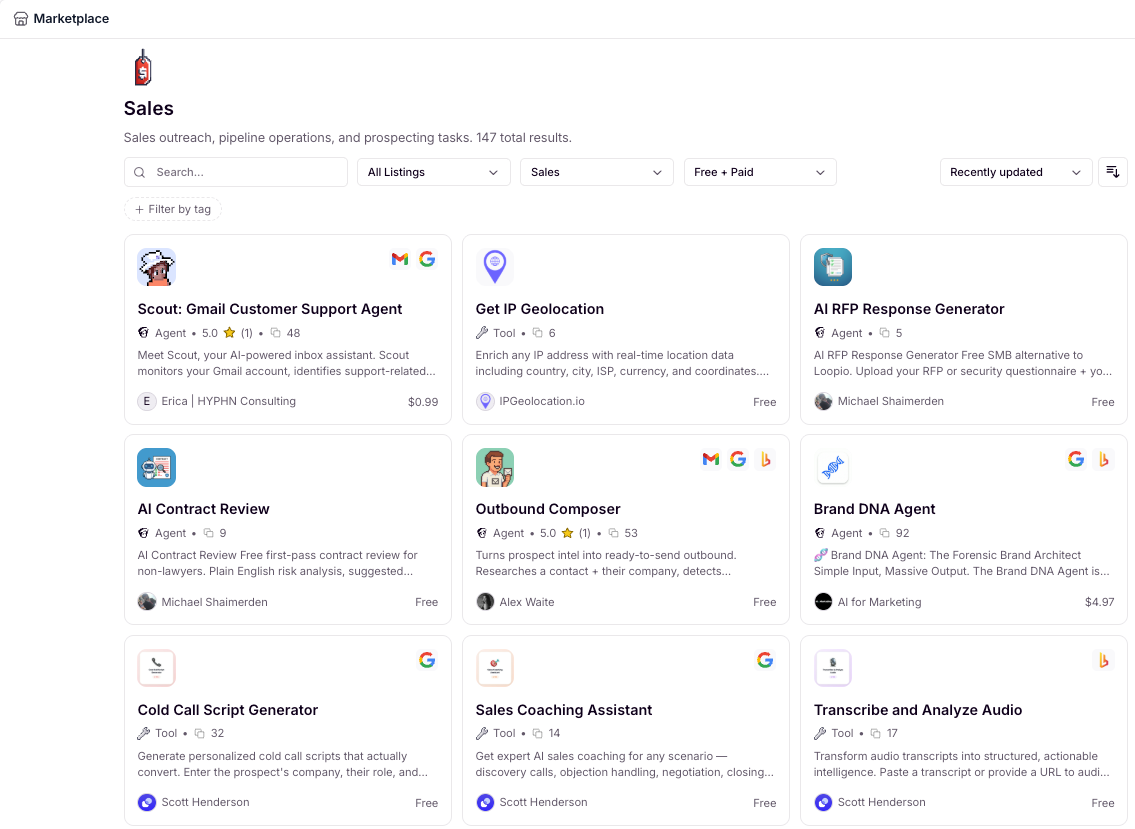
We also like to use tools like Claude to help draft process maps, workflows, and initial agent requirements.
Treat Your Agent like an Actual Team Member
The teams seeing real value from BDR agents, sales agents, and customer success agents aren’t treating AI like a shortcut or tool or magic solution. They’re treating it like a team member, a core part of your company’s operational infrastructure.
Like any new hire, you want to outline:
- Clear responsibilities
- Clear workflows
- Clear measurements
- Mechanisms for continuous improvement
And because agents need to evolve alongside your business, the work is rarely one-and-done.
In our next post, we’ll walk through practical agent use cases for SaaS companies running Salesforce — including examples for Sales, Customer Success, RevOps, and executive reporting. Look also to our other posts on how to best deploy your agents, and how to introduce your agent like a team member to your team.
If your team is trying to operationalize AI while also running the business day-to-day, OpFocus can help you evaluate, design, and maintain agent workflows that fit the way your company actually operates.
Talking SaaS Benchmarking with Lauren Kelley (CEO, OPEXEngine)
Salesforce Names OpFocus Founder David Carnes to Exclusive 2021 Salesforce MVP Program
No Comments Yet
Let us know what you think