

 There are many routes to integration with Salesforce. The Bulk, SOAP, REST, and Metadata APIs are all powerful tools for integration. But they can be complex, requiring a substantial effort to set up. What if you want something quick and easy?
In this post I'll highlight 2 simple ways to add Leads and Cases: Web-to-Lead and Web-to-Case
Web-to-Lead
This provides a simple way to create a Lead in an org. Lets say you have want to push Leads into your partner's Salesforce orgs, but you don't want to create a complex integration. Web-to-Lead may work.
Just navigate to Customize->Leads->Web-to-Lead. Verify that Web-to-Lead Enabled is checked, click Create Web-to-Lead Form, then select the fields you want to include in your form.

Here is the (yes, unstyled) form that is created. Lovely.
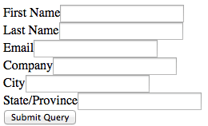
And the HTML:
<form action="https://www.salesforce.com/servlet/servlet.WebToLead?encoding=UTF-8" method="POST">
<input type=hidden name="oid" value="00DEXXXXXXXXXXX">
<input type=hidden name="retURL" value="http://"><label for="first_name">First Name</label>
<input id="first_name" maxlength="40" name="first_name" size="20" type="text" /><br>
<label for="last_name">Last Name</label>

<input id="last_name" maxlength="80" name="last_name" size="20" type="text" /><br>
<label for="company">Company</label>

<input id="company" maxlength="40" name="company" size="20" type="text" /><br>
<label for="city">City</label>

<input id="city" maxlength="40" name="city" size="20" type="text" /><br>
<label for="state">State/Province</label>

<input id="state" maxlength="20" name="state" size="20" type="text" /><br>
<label for="phone">Phone</label>

<input id="phone" maxlength="40" name="phone" size="20" type="text" /><br>
<input type="submit" name="submit">
</form>
You can embed this in a web site to capture Leads. Forget about that, though. What this really provides is a simple mechanism for pushing Leads into an org with just an HTTP POST. The oid value on line 2 is the critical value from the form, that is the identifier that connects your POST to the correct org.
Here is how I could accomplish this using Java, with some sample input values:
 1 String urlParameters =

 2    "oid=00DEXXXXXXXXXXX” + ”&” +

 3    “first_name=Susie” + “&” +

 4    “last_name=Tester” + “&” +

 5    “company=Testing, Inc” + “&” +

 6    “city=Burlingon” + “&” +

 7    “state=MA” + “&” +

 8    “phone=9415551212”;

 9    String request = "https://www.salesforce.com/servlet/servlet.WebToLead?encoding=UTF-8";

10    URL url = new URL(request);

11    HttpURLConnection connection = (HttpURLConnection) url.openConnection();

12    connection.setDoOutput(true);

13    connection.setDoInput(true);

14    connection.setInstanceFollowRedirects(false);

15    connection.setRequestMethod("POST");

16    connection.setRequestProperty("Content-Type", "application/x-www-form-urlencoded");

17    connection.setRequestProperty("charset", "utf-8");

18    connection.setRequestProperty("Content-Length",

19                                  "" + Integer.toString(urlParameters.getBytes().length));

20    connection.setUseCaches (false);

21    DataOutputStream wr = new DataOutputStream(connection.getOutputStream ());

22    wr.writeBytes(urlParameters);

23    wr.flush();

24    wr.close();

25    connection.disconnect();
There are a few limitations. There is a daily maximum of 500 Leads. Any universally required field must be provided or validation will fail. Even so, if your partners allow it, their admin can set this up in 5 minutes, send you the generated form and you can push the Leads into their system. No custom API, no OAuth, just POST and done.
Web-to-Case
Similar to Web-to-Lead, this allows you to add Cases with an HTTP POST. Navigate to Customize->Self-Service->Web-to-Case to build a sample form. This is less likely to be useful in my simple integration scenario, since you may have to set up queues and assignment rules that might not fit with your requirements. Like Web-to-Lead, Salesforce runs field validation rules before creating records submitted via Web-to-Case and only creates records that have valid values, and required fields must have a value. Even so, it can be an easy way to push a Case into your or your client's org.
Still need help?
Need help with optimizing or fixing your legacy, custom code? Need to focus on another initiative and don't have time to deploy your code?
OpFocus' developers can
help your company get out of the tangle that you're in. Leave a comment below, or
reach out to us directly!
Share this
3 Simple Ways to Recycle Leads Using Salesforce

3 Simple Ways to Recycle Leads Using Salesforce
Jul 13, 2011, 7:00:00 PM
2
min read
How to Convert a Lead In Use By a Time-Based Workflow in Salesforce

How to Convert a Lead In Use By a Time-Based Workflow in Salesforce
Aug 18, 2011, 7:00:00 PM
3
min read
Going Mobile: Setup Salesforce1 in Less Than 30 Minutes
Going Mobile: Setup Salesforce1 in Less Than 30 Minutes
Mar 23, 2015, 8:00:00 PM
3
min read
No Comments Yet
Let us know what you think